Posts

How to change the owner of PowerApps

Image
I have seen many blog posts and videos about how to change the owner of a PowerApp. The problem is that all the blogs posts out there (as of 4/21/2020) don't tell you how to change the owner to someone other than the Global Administrator running these commands. Some blogs just tell you there is a command which is supremely unhelpful. So I plan to fix that. Q: Why would you change it? A: In case someone created an app that left the company you want to transfer it. Or perhaps you created the app and you want to transfer ownership of it to a Service Account that will live beyond you. Q: Why not just use the Export/Import process? A: You can, but that is not the point of this article. What you need 1) An Office 365 Global Administrator account and access to Azure Active Directory users portal 2) The App ID and Environment ID (more below) 3) PowerShell Get the details 1) In a browser, login to admin.powerapps.com as a Global Administrator 2) In the Environme...

SqlException (0x80131904): profile name is not valid or Error 14607 Procedure: 'sp_send_dbmail'

Image
Recently I needed to patch my SharePoint 2013 on-premises environment with the August 2019 Cumulative Update (CU). After the binaries were installed on my farm, I proceeded to run the SharePoint Products and Configuration Wizard (henceforth, Config Wizard) to complete the process. Inevitably, this is where most SharePoint patches fail, but it usually takes a long time to do so. But this time, the failure was almost immediately, specifically Step 2 out of 10. Symptoms and Error Messages The error message indicated  Exception: System.Data.SqlClient.SqlException (0x80131904): profile name is not valid .  and gives you the link to the error log as shown below. A review of the log didn't really provide any other details. After restarting the necessary SharePoint services, I was able to get back into Central Administration. I increased the logging level to Verbose to try and get more information about the error. Restarting Config Wizard and using a ULS Viewer  to catch...

Unknown server tag 'AdminControls:MigrationToolPromotionTip'.

Image
I was applying the August 2019 CU for SharePoint 2013 in my Test environment. After installing the binaries, I tried to go to Central Administration to view the Servers in Farm page to verify the status. Instead of loading the homepage, I got the error message Unknown server tag 'AdminControls:MigrationToolPromotionTip'. I was able to get to other pages within Central Admin by typing in the URL directly. After successfully completing the Products and Configuration Wizard (which you should do after every patch), Central Administration loaded successfully. I then noticed a new advertising banner touting their SharePoint Migration tool. Not a coincidence.

SharePoint Online bug: New page opens with 500 Internal Server Error

Image
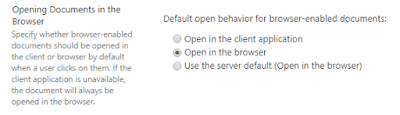
Issue: In a SharePoint Online site collection, any publishing features (and Wiki pages) will not allow you to create a new item. Pages, Site Pages, Reusable HTML and Reusable Text using the modern interface. Error: Either a blank page with the standard "500 Internal Server Error" or nothing at all in the Reusable Content libraries. Workarounds: 1) Use the Return to classic SharePoint to create these items. The errors will persist in the modern interface and you will need to manually switch each time the site is in the modern interface. 2) Change Document Library default open behavior setting. This will allow each library you set this way to behave normally. Advanced Settings > Open Documents in the Browser and set to "Open in the browser". 3) Disable the Open Documents in Client Applications by Default Site collection feature. This will prevent the issue completely. Root cause: Microsoft has confirmed a bug in a code release is causing...

Outlook cannot open a new form on SharePoint Workflow Open this Task buttons

Issue: Recently a user stated they were getting an error message in Outlook stating "Outlook cannot open a new form. The form contains schema validation errors." when they clicked on the Open this Task button in a SharePoint Task assignment email. Root Cause: The user had created an out-of-the-box Approval workflow and inside the Request box had entered several HTML tags like <a href="site">link</a> where the site reference in the href was outside of SharePoint. Resolution: While I don't recommend putting HTML tags in the Task assignment emails in workflows, it will work if you reference the same SharePoint site or site collection the Task is coming from.

SharePoint 2013 Site Owner cannot manage Access Requests (Updated)

I have been pulling my limited hair out for a week trying to figure out why a Site Owner will Full Control on the site would always get denied when they tried to respond to Access Requests. When they received the email and clicked on " Accept or decline this request " which goes to https://[siteurl]/ Access Requests/pendingreq.aspx they would get " Sorry, this site hasn't been shared with you. " Preliminary Troubleshooting Steps I went through each and every permission group on the site to make sure the Site Owner group was the owner of the group. I went through each list or library that had broken site permissions and made sure the Site Owners group had Full Control of those as well. They all did. Then I looked at the Permission Level of the Site Owner's group. It said Full Control, but it also had that awful "Limited Access" permission. This site had many owners and many times they all tried their best to limit access to certain things and...

SharePoint Servers with underscores. Trouble ahead.

SharePoint_Server_Name = Trouble_Ahead I recently had a friend of mine ask for some SharePoint 2013 troubleshooting help. It seemed that the server was running fine (Single Server Farm) but trying to configure a Secure Store Target Application for Excel Services that was causing grief. The error message was  "Your session has expired. Restart this wizard to continue." The Correlation ID has a few errors, but one in particular stated  "_admin/sssvc/ managetargetapplicationinstanc e.aspx' doesn't match the Page '_admin/sssvc/ managetargetapplicationfields. aspx"  which in itself is not very useful.  But looking more into that error and noticing the server name is  sharepoint_dev  a light went on and a feeling of dread for said friend.  SharePoint doesn't like underscores in server names, especially service apps on a single server farm where Central Admin is using the server name as the URL.  You have two options really.  You c...

The installation of this package has failed on SharePoint 2010 August 2013 CU

Image
This post is something I encountered for the first time I can remember. Honestly, this may have happened before, but not in the last 3+ years of patching SharePoint 2010/2013 have I encountered the following error; "The installation of this package has failed." I've had my fair share of Config Wizard failing, but never the initial binaries failing. Did a bit of digging and the root cause was me, having had to only use one executable for patching SharePoint, not paying attention to the CU hotfix package. This particular package extracted an extra cab file, specifically ubersrv_1.cab. I mistakenly deleted that file and just tried to use the .exe. Thanks to http://blogs.msdn.com/b/kaevans/archive/2013/06/11/sharepoint-2013-kb2726992-the-installation-of-this-package-failed.aspx for steering me in the right direction. If it were not for Google/Bing/Yahoo (insert search engine of choice) I would still be perplexed.

Missing SharePoint 2010 Help Collections

Recently a SharePoint farm I am working with was only showing a specific Help item. It was the most recent third-party tool and nothing else. Within each Site Collection is a Help Settings link. This determines what Help Collections you can show to a user and typically contain at least the SharePoint 2010 help, but this was missing. Stumbling through little or nothing, I found that the actual help items are stored in "C:\Program Files\Common Files\Microsoft Shared\Web Server Extensions\14\HCCab\[language id], which in the English language pack is 1033. There were plenty of files here, but not seemed to be installed. Using SharePoint Management Shell you can find out what Help Collections are installed. Get-SPHelpCollection is detailed on this TechNet article . To fix this, the Help Collections simply needed to be installed using Install-SPHelpCollection, detailed in this TechNet article . So I simply ran Install-SPHelpCollection -LiteralPath ‘C:\Program Files\Common File...

SharePoint 2010 Groups Display Item Limit

The issue at hand is when you go to Site Actions > Site Settings >  People and Groups. Under the Quick Launch the Groups are displayed. If you select "More..." you go to the /_layouts/groups.aspx page to hopefully sell all the SharePoint groups listed in that Site Collection. For some unknown reason I can only see the first 30 groups. This happens in 2 of the 5 SharePoint 2010 environments I have tried this on. Some have many site collections, some have 1, some are pre-SP1 and some are post SP1.  As usual, when I write a post it is because I had a hard time finding the exact fix for my problem. There are a few other blog posts out there with the same issue, but they did not fix the issue for me. I will list those below if it may help someone else. The fix for me was actually a comment on another post on SharePoint 2007 with the same issue by "Carlos J Sosa M" which was quite easy to do, unlike finding GUIDs and the like. I have modified for clarity. 1...

InfoPath cannot find or cannot access the following web server

Image
I recently had a user state they could not publish an InfoPath form to a SharePoint Form library that was not setup for InfoPath Forms Services. Since that required an Enterprise CAL it was not enabled until a license was purchased. During the troubleshooting I walked through their form and verified it was set to the correct Compatibility level. I went into the Form Library that was created and verified "Open in Client Application" was also selected, but each time the error was that InfoPath couldn't find the server. Having reproduced this on several sites and even different web applications and several farms, I knew it had to be either proxy or network related. I've seen numerous post about that exact error, but could not pinpoint a fix. I progressed down the path of it being a proxy issue, a LAN setting, etc., but I was wrong! A big clue came when I notice the "New Document" was active even though I had not published a Form yet. When I clicked on i...

SharePoint 2010 Spell Check Not Working?

I recently had an issue where Spell Check was not working for any site, any site collection or any web app in SharePoint 2010. It also occurred in two different SharePoint farms. The error message was "The spelling check cannot be completed because there is no dictionary installed for the current language." and occurred in any list item or page where spell check was an option. Although you can enable/disable the Spell Checker feature in Central Admin in Manage Farm Features, it was already Activated. Deactivating and re-Activating did not resolve it. A few other posts I read indicated it may be a permissions issue relating to the SharePoint permission levels, but those turned out to be a dead end as well The ultimate fix was actually file permissions on the server. I did not have the local "Users" group granted Read access on the Program Files folder where SharePoint was installed. I granted that group this right, did and IISRESET an SharePoint Spell Chec...

Assigned Custom Tasks, Titles, Pausing workflows and the dreaded failure to resume

I've had mixed results with pausing SharePoint Designer workflows based on a duration. Inevitably it will work a few times and then stop for no apparent reason when the pause duration ended. It could be the environment, a service pack level, or even a hotfix needing to be applied. I was using the "Collect Data from User" action in a workflow and I needed to update the Title and pause for a while so that the Task List's Related Content field matched. (more detail in the Background) Pausing for any duration did not work. It simply stated "Failed to run" after pausing. I did some research and found lots of hits on this, but nothing I could actually do. I didn't have physical access to the server to apply a hotfix or run any stsadm commands. So I tried a different approach as outlined below. 1) Added a status column on the first list, the one processing the information that the Task assignment workflow ran on 2) Modified my first workflow to on...

Ban/Limit Access for a single user in SharePoint

Image
Recently I had a request. Secure SharePoint from people casually looking through the list of our sites. Well, the site in question wasn't public facing and anonymous access is turned off, so by default, you had to be authenticated to even see it. "Oh no, this user is an authenticated user, they just shouldn't see it".... which got me off on a rant about how making Active Directory insecure makes your applications that depend on it insecure as well. If you provide a generic account with a password that doesn't expire, you opened up a hole. Even worse, it was just one user out of hundreds of users. I've seen a lot of people talk about how you can jump through hoops to remove "NT AUTHORITY\authenticated users" from sites, how you can limit exposure to people adding it to your Visitors group and so on. Yeah, it works, but it is overkill in this instance. The easiest approach is Central Administration. Central Administration > Application Manag...

InfoPath Error 5566 in SharePoint

Recently a project I have been working on was to convert some existing forms to be used within SharePoint Forms Services/InfoPath Forms Services. The forms needed to have the user's Full Name instead of their logon, which is a relatively easy thing to pull out of the profiles imported in the Shared Service Provider. All went well until testing when I would occasionally receive Error 5566. I spent countless hours trying to troubleshooting. The environment was load balanced so I had to edit my host file to point to one of the 3 servers that may be causing it. I finally tracked it down to one of the three, but nothing in my research really seemed to work. The most common "solution" people had was to disable the loopback check in the registry, one I see way too often and one that is really a bad idea on a production system. More research pointed to the use of load balancers and double hop authentication problems. All of these didn't really seem to help and I won't...

Customization and Configuration

As of recently, SharePoint is starting to take off here at my current employer. Good and Bad. Good is that it is my responsibility and I’m happy to see the usage take off like a jet plane. Bad because everyone is starting to use it all at once and they all want to “tweak” or “change” or “customize” all the things SharePoint does. Except there is one problem. They use those terms to describe what I would consider SharePoint development. Things they want are not built-in, require custom coding of web parts, extensive use of either SharePoint Designer or Visual Studio. So what is the problem with that? 1) I’m not a developer. I have done custom pages, custom workflows, etc., but not rewriting SharePoint controls like the Contact Details web part. 2) These simple “tweaks”  are not simple. Heck, they don’t even know how to upload documents to SharePoint and they want to have the Rich Text Editor work like Word. In SharePoint 2007, that is not how it works. Back to the point, to cu...

My Site link back to the Portal

Image
Sometimes I’m just baffled by how SharePoint makes the simplest of things so difficult. Case in point is the lack of a link back to your SharePoint portal from your My Site. Why? Well, the SharePoint structure isn’t apparent to the average end user. They don’t know that each My Site is a separate Site Collection, but why do we need to punish them (and their laziness) and make it difficult to get back the portal? This can be solved various ways. Some tedious, some simple. This is the simplest way I have seen to do it. Launch the Central Administration URL. Go to the Shared Service Provider site specific to the My Sites (if you have more than one) Under “User Profiles and My Sites” select “Personalization site links” Add a New Item For the URL enter your Portal address, including the Default.aspx page Add a “#” symbol at the end. Enter a description and owner and your set. What does the # symbol do? It tells your browser to ignore anything after it. T...

This site content type cannot be deleted

I will reiterate that most my posts are not for the true SharePoint Developer. Those using Visual Studio to do most, if not all, of this custom application will find better ways for the most part. No, this post is for people who want to use SharePoint out of the box and then have found themselves using SharePoint Designer workflows. A reoccurring problem I have is that when I create a SharePoint Designer Workflow and decide later I need to redo it. I create a workflow that assigns a task and name that say "Task 1". This creates a list content type and a site content type. Later I delete that section of my workflow, but I go back later to add it again, choosing the name it Task 1 again, but you get an error messaging stating it is already in use. Knowing full well you were the one that deleted it, how do you go about using that same name? First, go to you Task list settings. There will be a section called Content Types. Select the one you want (in this case Task 1) and d...

Collect Feedback Workflow never completes

Image
Here is a new one I ran into the other day. The user was using the standard Collect Feedback workflow on a Shared Document library. Then another user noticed that they received an email stating their task was overdue, even though it stated it was Completed in the Tasks list. Initially I noticed that users were stating their Tasks were complete, but had percent complete ranging from 0 to 100%. A pet peeve of mine for sure, but why does this matter? The Collect Feedback workflow relies on this field to be 100%, otherwise the workflow never finishes. So after a chance Google search I found a Microsoft KB article with a similar issue on the Approval workflow. As it turns out the Assigned To column must be set to allow only one person per task. Allowing multiple entries prevents the workflow from marking percent complete at all. Here is how to change that setting. Go to the Tasks list Go to Settings > List Settings Under Columns, select Assigned To Make sure "Allow multiple...

Inspiration

Over the years I have spent countless hours trying to find solutions to different problems or bugs in SharePoint. I'm thankful that I've had the opportunity to provide these solutions for many different companies in need. What I'm not thankful for is that one power user in each company tends to find the little annoyances in SharePoint that drive me crazy. Things that have always annoyed me, things that I have to continually find a workaround for. That is why I created this blog. There has to be others out there that need this same information, that aren't SharePoint Developers, but SharePoint Administrators that need better information. I'm not saying the information already out there isn't good, it's usually just poorly organized. Sometimes it is just really poorly written. And lastly I have seen many posts that are technically correct, but just don't follow through with a good solution that others can easily digest. I'm also going to spend so...